Cemetery Map
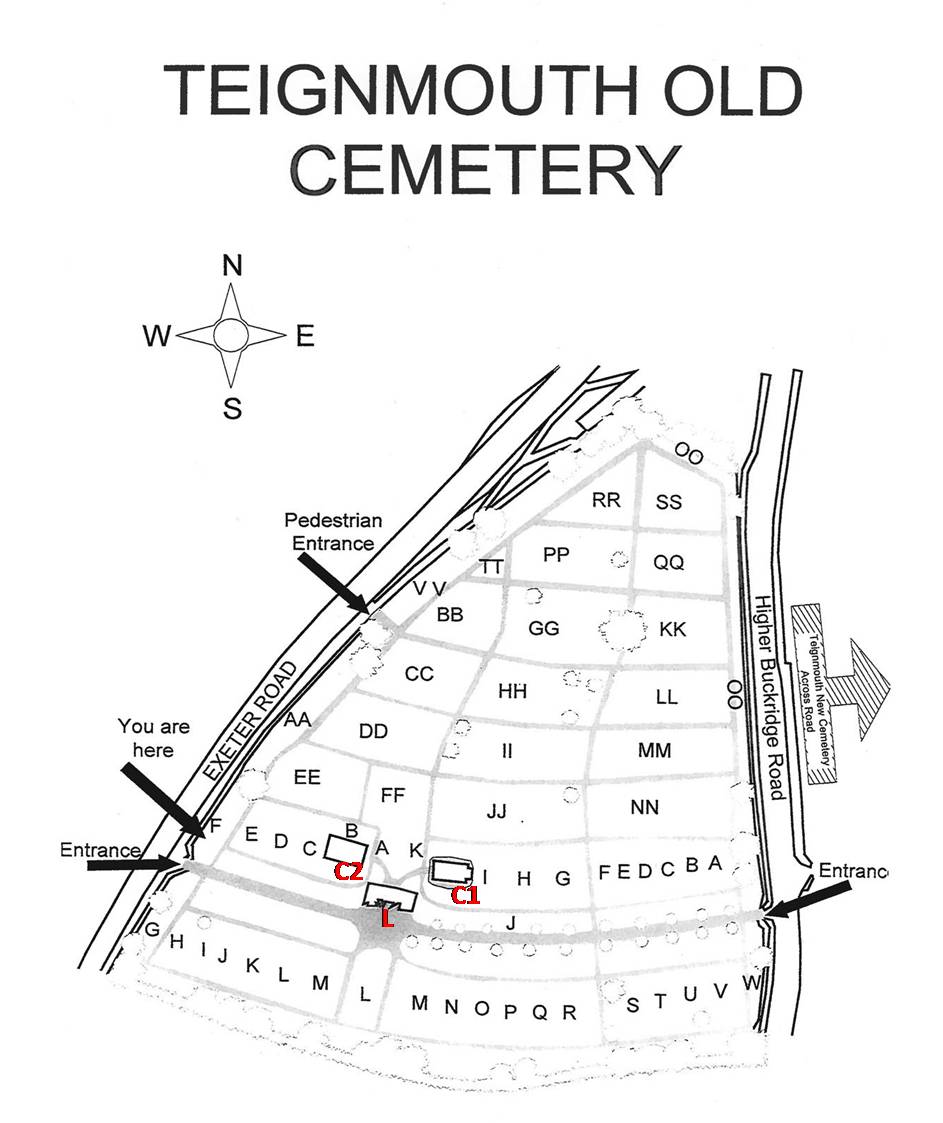
This section helps you locate where someone is buried if you already have a plot number for that person. The adjacent picture shows the layout of sections in the cemetery whilst the plot map below shows all the grave plots in section BB.
Section Plot Map
You can use the information on the plot map to triangulate on the grave you are looking for based on other graves you can find around the edges of the section. For example if you are looking for someone buried in BB058 you could look for the Green grave (plot 54) on the western edge of the section and then walk inwards to the second plot from there; or the Newton grave on the southern edge and walk up 3 plots .

GPS Location
If you have a smart device with GPS location you can use the subsequent tables to view the map location (use satellite view) of the grave on the “Findagrave” site which will give you an approximation within a few metres when you are in the cemetery. It also gives a picture of the grave you are looking for and other details.
You can skip here to either the table Sorted By Name or Sorted By Plot. YET TO BE ADDED
(Notes. In the tables “Date of Death” is as recorded on the grave; if nothing is recorded then the date shown is the date of burial. A “View Memorial” link means there is a visible identification of the person at the plot , either on a headstone, kerbstone or similar. A “View Grave” link means that the grave is unmarked.)
 Teignmouth Old Cemetery